New preset brushes provide examples of how to take advantage of
ZBrush 4R4's key features: Curve Strap, Curve Track, Insert types and
more.
Create Insert and Multi Mesh Insert brushes with a single
click.
Insert Brushes now use the brush Imbed setting to define the
depth of the insertion.
Insert Brushes now use the Z Intensity setting to apply a
squash factor along the insertion normal.
Projection Strength function conforms the inserted mesh to the
underlying surface.
Be recognized for your contributions! You can now provide your
name and website info to a brush before exporting and sharing it with the
community.
Tool and Geometry
Maximum DynaMesh resolution has been increased to 2048.
Mask Peaks and Valleys function detects portions of the mesh
with the greatest detail density. This function is used internally by
QRemesher but is also available for general use via the AutoMasking
options.
Quickly create a PolyGroup from a mask. This is especially
useful with the new topology replacement features.
New Cluster option for the Group Visible function controls the
way its randomization will act.
Grow All visibility function makes all the current mesh's
polygons visible.
Mesh to Brush function converts the mesh of an Insert Mesh brush
to a new Tool.
New topology cleaning tools: Merge Triangles and Weld Points.
Mesh Extract gains two new controls: Corner Quad to Triangle
and Thin Border.
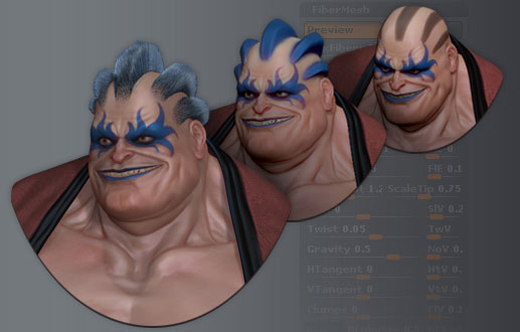
FiberMesh
Merging different SubTools which are FiberMesh aware preserves
the designation if they have the same number of vertices per fiber.
The Group Visible function is now FiberMesh aware and uses the
Coverage value to regroup the fibers.
The Split Hidden and Group Split functions are now fiber aware.
The Inflate deformer now has a reduced effect when used on a
FiberMesh.
彩現與材質
New Vibrant Shadows and AO setting generates more strongly
color-saturated shadows.
The Background image can now be tilted.
The Background image may now be synchronized with your model's
rotation.
匯出與匯入
Vector Displacement map export quality has been improved.
UV Offset has been added in the Preferences palette's Export
options for use with Vector Displacement.
.EXR File format has been added for Vector Displacement maps.
GoZ now supports Maya 2013 and Luxology modo 601. (Note: modo
601 on OSX requires a manual update when importing a model.)
·GoZ現在支援Maya 2013和Luxology modo 601。
(Note: modo 601 on OSX requires a manual update when importing a model.)
Miscellaneous
XPose now displays the SubTools as a contact sheet.
Improved notification when saving large projects. (2Gb to 4Gb)
New SubTool commands Delete All and Delete Other help to
quickly clean your projects.
Improved overall Projection speed.
ZBrush preferences settings are now stored in a Public folder
for improved permissions compatibility with Windows and Mac.
The location of the ZBrush virtual memory/cache files can now
be changed, providing performance improvements on systems where the system
drive is not the computer's fastest drive or is running low on disk space.
New ZScript commands have been added, mainly to manage the
SubTools.
FiberMesh to create real 3d fiber, fur and hair geometry with export capabilities.
New set of dedicated FiberMesh "Groom" brushes and corresponding Brush settings.
MicroMesh support to render fibers or single polygons as separate 3D objects.
New set of BPR filters and operators to greatly improve your final ZBrush renders
BPR Global Shadow and Ambient Occlusion settings simplifying shadow management.
New Cavity Mixer used to define different material shaders based on the mesh cavities.
Improved small details creation through Alpha and Mask. Alphas may be placed using TransPose.
Surface Smoothness feature detects mesh curvature for Mask creation.
New global deformation with Transpose Curve deformation and UnClip.
Improved Mask operations with Shrink and Extend.
Topology editing additions: Group Mask and Edgeloop Mask Border.
New JPEG Exporter with Crop, Preview and adjustment settings.
Numerous improvements such as storing shadow information based on the camera point of view, preview of mesh Extraction, Auto Adjust Mode for perspective… and a lot more.
特別要介紹BPR renderer,只能用”驚豔”來形容!當你導入HDRI貼圖來當environment map時,BPR renderer就快速模擬了一個全景環境,旋轉場景時模型和環境是同步關聯的,不僅可以選擇一個最佳的渲染角度,HDRI還能為雕刻物體帶來真實的全域光照明和環境反射,還能調節光照的顏色、資訊…等,在很短的時間內就能得到真實完美的渲染效果!還有一些紋理細節的處理也更完美地做了改善,像是肌肉群的結構刻畫、磚牆的接縫(創造的新物體預設就有磚塊的紋理),至於ZBrush 4R2的正式發佈時間,目前官網是:ZBrush 4R2 will be released for both Win & Mac on 9/20/11! (September 20th, 2011) .